A family command center for three kids has to catch dozens of small moving pieces. The mess is rarely one big disaster. It is usually a permission slip on the counter, a tablet with no charge, a backpack in the hallway, and a practice time that still lives in somebody’s text thread.
I have learned that adding more baskets does not fix that kind of chaos. What helps is giving the family fewer places to check and giving each child a clear lane through the system.
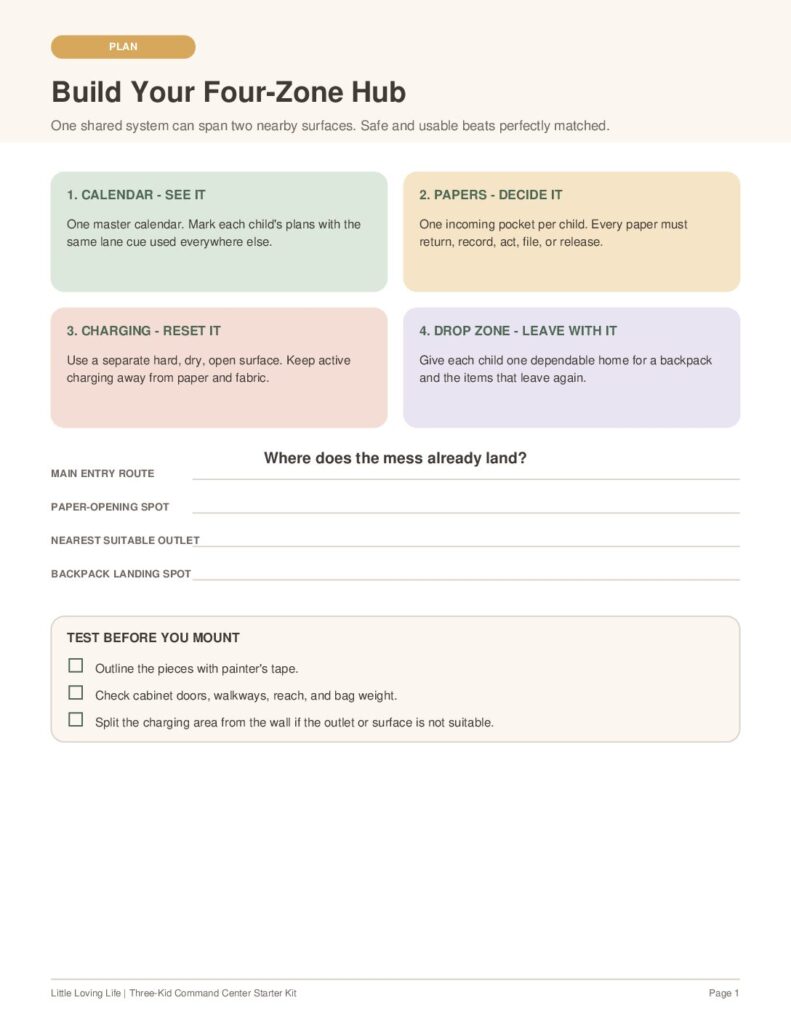
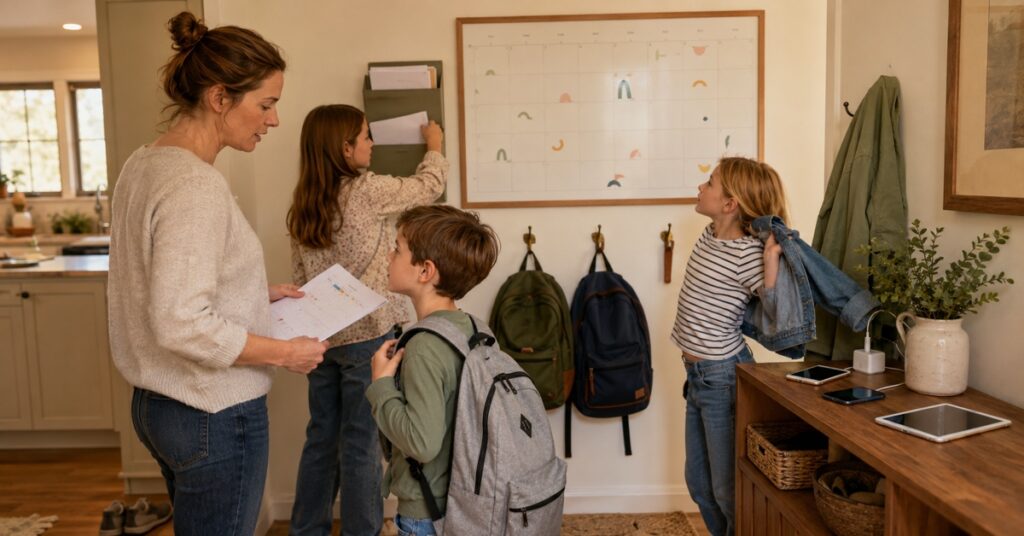
The simple answer: Build one shared hub with three kid lanes and four working zones: a calendar, a paper station, a charging spot, and a drop zone. Use the same color, name, or icon for each child in every zone. That way, nobody has to relearn the system from one part of the wall to the next.
Why a pretty command center can stop working
A family command center can look beautifully organized on setup day and still become another cluttered surface by the end of the month. The problem is usually not the hooks or the labels. It is that the space stores things without telling anyone what happens next.
One large paper bin becomes an anonymous stack. Two editable calendars start disagreeing. A charging basket fills with tangled cords. The bench becomes a holding area for sports gear that nobody remembers to move.
For a family with three children, the setup needs to answer four questions quickly:
- What is happening next?
- Which child does this belong to?
- What action does it need?
- Where does it go when that action is finished?
If your command center answers those questions, it can be simple. If it does not, even a whole mudroom may feel too small.
Family command center for three kids: the one-hub, three-lane, four-zone system
Start by choosing one visual cue for each child. A color is easy, but a small icon can help younger children who are not reading yet. Keep shared family information in a neutral fourth color.
Then repeat those cues in every part of the command center:
One family view, with each child’s events marked in the same color used elsewhere.
One incoming pocket per child, plus one shared place for items that need adult action.
A fixed, safer place for family devices and the correct chargers.
One clearly marked home for each backpack and the items that travel with it.
This does not mean everything must fit on one wall. It means the parts work as one system. If the best calendar wall has no suitable outlet, keep the charging spot on a nearby hard surface instead of forcing cords and devices into a paper organizer.
Choose the location before you buy anything
The best location is on the route your family already uses. Watch what happens after school: Which door do the kids enter? Where do they drop their bags? Where do you open school folders? Where is the nearest suitable outlet?
A beautiful wall in a formal hallway is not helpful if everyone enters through the garage. A kitchen corner may be perfect for papers and the calendar but too close to splashes for charging. A mudroom may catch backpacks well but be too cold, hot, or out of sight for devices.
Before mounting anything, outline the pieces with painter’s tape. Let the family walk past the mockup for a few days. Check whether cabinet doors still open, straps fall into the walkway, and younger children can reach the parts they are expected to use.
Keep the first version lean. A calendar, three paper pockets, and three secure backpack spots are enough to test the routine. Add a memo board, supply cup, or decorative shelf only after the basic flow is working.
Zone 1: Make one calendar the source of truth
A wall calendar and a digital calendar can work together, but they should not compete. Pick one as the master. The other is a display.
If your digital calendar is the master, use the wall to show the current week and the details people need while leaving the house. If the wall calendar is the master, set one recurring time for an adult to update it and use phone reminders only for alerts.
For three kids, write entries in a short, consistent format:
- Who: the child’s color, initial, or icon.
- What and when: the event and start time.
- What must leave the house: library book, form, uniform, snack, or project.
That last line matters. “Field trip Friday” is information. “Field trip Friday—signed form in backpack” is a useful departure cue.
Keep private details off an open wall. If the calendar can be seen through a window or from the front door, use initials and general labels. School names, pickup codes, passwords, medical details, custody information, and exact travel plans belong somewhere private.
Zone 2: Give school papers a decision, not just a bin
Three incoming pockets prevent one child’s papers from burying another’s. Label each pocket with the same cue used on the calendar. The pockets are landing places, not archives.
When papers come in, use this flow:
- Return: Sign or complete the paper, then put it straight back into the correct backpack.
- Record: Move dates or reminders to the master calendar. Keep the original only if the school requires it.
- Act: Put forms that need payment, a reply, or a decision in one shared adult action file, still marked for the correct child.
- File: Move report cards, medical records, and other long-term documents to a closed family file.
- Release: Recycle or shred what no longer serves a purpose.
Artwork needs its own family rule because no wall pocket can hold a school year of paintings. You might keep a small rotating display and move selected pieces to a memory box. The important part is deciding before the pile feels too sentimental to sort.
A shared “Action” pocket is useful only if an adult checks it at a predictable time. If urgent forms disappear there, place the action pocket beside the calendar rather than underneath the children’s incoming papers.
Zone 3: Create a safer family charging spot
A shared charging spot gives phones and tablets a place to land, and it can make a family media rule easier to follow. It is still an electrical area, not another decorative basket.
Choose a hard, dry, open surface with room around the devices. Keep paper, fabric, backpacks, and other things that can trap heat away from the charging area. Use the charger supplied or approved by the device manufacturer, and follow the device instructions.
The U.S. Fire Administration advises families not to overload outlets and warns against charging through extension cords or multi-plug adapters. It also says to stop using a lithium-ion battery or device if you notice an odor, discoloration, excessive heat, a change in shape, leaking, or unusual noises. See the agency’s battery fire safety guidance and electronic-device charging handout.
Charging safety: Do not hide an actively charging device under school papers or inside a closed fabric bin. Adults should manage outlets and inspect damaged cords or unusual batteries. Follow the manufacturer’s directions, and ask a licensed electrician about an outlet or circuit if you are unsure.
Give each device a labeled slot or cable tag that matches its child’s lane. The label helps with ownership; it does not make young children responsible for electrical safety.
If you use the charging area as part of a screen-time boundary, make the rule for the whole family. The American Academy of Pediatrics recommends creating a family media plan that fits your routines and revisiting it as children grow. Its family media plan guidance includes ideas such as screen-free times and places, but your charging routine can be adapted to your household.
Zone 4: Build a drop zone children can actually use
The drop zone should hold what leaves the house again. That usually means backpacks, activity bags, jackets, and perhaps a small basket for seasonal items. Lunchboxes and water bottles should continue to the kitchen rather than spend the night inside a bag.
Give each child one defined backpack spot. A hook works if it is securely installed for the expected load. A cubby or floor basket may work better for a heavy bag, a rental, or a child who finds hanging difficult.
Keep the floor path clear and place heavier items low. If you use a freestanding shelf, dresser, or other furniture that could tip, follow its anchoring instructions. The U.S. Consumer Product Safety Commission’s Anchor It! guidance recommends securing top-heavy furniture and keeping tempting objects off high surfaces where children may climb for them.
Reachability should match responsibility. A preschooler can put a light backpack in a low basket. An older child may manage a secure hook and empty the paper folder. Adults should still handle anything mounted high, electrically powered, unusually heavy, or private.
If the backpack itself keeps sliding off a hook or overwhelming a smaller child, check our height-based kindergarten backpack fit guide before changing the whole drop zone.
Use two short routines instead of constant tidying
The after-school landing
- Backpack goes to the child’s drop-zone spot.
- Lunchbox and water bottle go to the kitchen.
- School papers go into that child’s incoming pocket.
- Devices go to the charging area when your family’s routine calls for it.
That is enough for the child-facing routine. Do not turn arrival home into a long organizing session. The purpose is to land the moving parts so an adult can process them without searching the house.
The evening launch
- An adult checks the action file and transfers dates to the master calendar.
- Completed forms return to the correct backpack.
- The family checks the next day’s departure cues.
- Devices and bags finish the night in their assigned places.
This pairs naturally with a simple morning routine because the decisions were made before everyone needed shoes at the same time. Our guide to morning routine tools that actually work can help you build the next part of that handoff.
A small-space command center does not need a mudroom
In a small home or rental, build vertically and separate the charging spot if needed. The command center can be a narrow strip beside the main door, the inside of a pantry door, a section of a kitchen wall, or a portable file box paired with three bag spots.
| Space | Keep here | Move elsewhere |
|---|---|---|
| Narrow wall | Weekly calendar, three slim paper pockets, three secure hooks | Long-term files and charging, if there is no suitable surface or outlet |
| Inside a cabinet or pantry | Calendar display, action list, paper folders, pens | Backpacks and actively charging devices |
| Rental entry | Portable file box, labeled baskets, removable visual labels | Heavy wall-mounted storage unless properly approved and installed |
| No entryway | Use the route between the door and kitchen as a linked system | Do not force every function onto one crowded surface |
The minimum useful version is not a miniature Pinterest wall. It is one trusted calendar view, one paper landing place per child, and one reliable home for each bag. Everything else is optional.
If one child still needs a more visual sequence, start with a simple daily routine chart rather than adding more storage to the wall.
Reset the system before it becomes storage
Choose one weekly moment to clear expired notices, review the coming week, return completed papers, and move long-term documents out of the hub. Check that labels are still readable, hooks are secure, cords are in good condition, and the charging surface is clear.
If one pocket overflows every week, do not buy a larger pocket first. Ask why papers are not leaving. If bags keep landing on the floor, check whether the hooks are too high, too crowded, or wrong for the weight. The mess is useful feedback about the system.
What should not live in an open family command center
- Passwords, pickup codes, detailed medical information, or custody documents.
- A permanent archive of every school paper.
- Chargers buried under papers, fabric, or bags.
- Heavy objects stored high enough to tempt climbing.
- Items with no owner, no action, and no exit rule.
A command center works best as a traffic controller, not a warehouse.
Family command center FAQs
What should a family command center include?
Start with one family calendar, a paper pocket for each child, one adult action file, a defined backpack spot for each child, and a separate safer charging area if your family uses shared devices. Add other storage only for a problem you can name.
Should we use a digital or paper family calendar?
Either can work. Choose one master calendar and let the other serve as a display or reminder layer. Problems begin when two calendars are both treated as editable sources of truth.
Where is the best place for a family command center?
Place it on the route your family already uses between arriving home, unpacking school items, and leaving again. The main entry, kitchen edge, mudroom, laundry area, or pantry can work if the location matches the routine.
How do I keep three children’s school papers separate?
Give each child an incoming pocket with a consistent color, name, or icon. Keep one shared adult action file, but mark every item so it can return to the correct backpack immediately after it is handled.
How do I keep the command center from becoming cluttered?
Give each category an exit rule and clear the hub at one predictable time each week. Papers should return, move to the calendar, enter a private long-term file, or leave the house through recycling or shredding.
Build the routine first, then make it pretty
The best family command center for three kids is not the one with the most matching containers. It is the one your children can read, your family can reset, and you can still trust on a busy morning.
Start with the routine you need tomorrow morning. One calendar. Three clear lanes. Four jobs: see it, decide it, reset it, and leave with it. Test that routine before adding more. A slightly plain system that keeps moving will serve your family far better than a beautiful wall nobody knows how to use.
Plan your own three-kid command center
Use this free seven-page starter kit to map your family’s calendar, paper flow, charging rules, child lanes, and weekly reset.