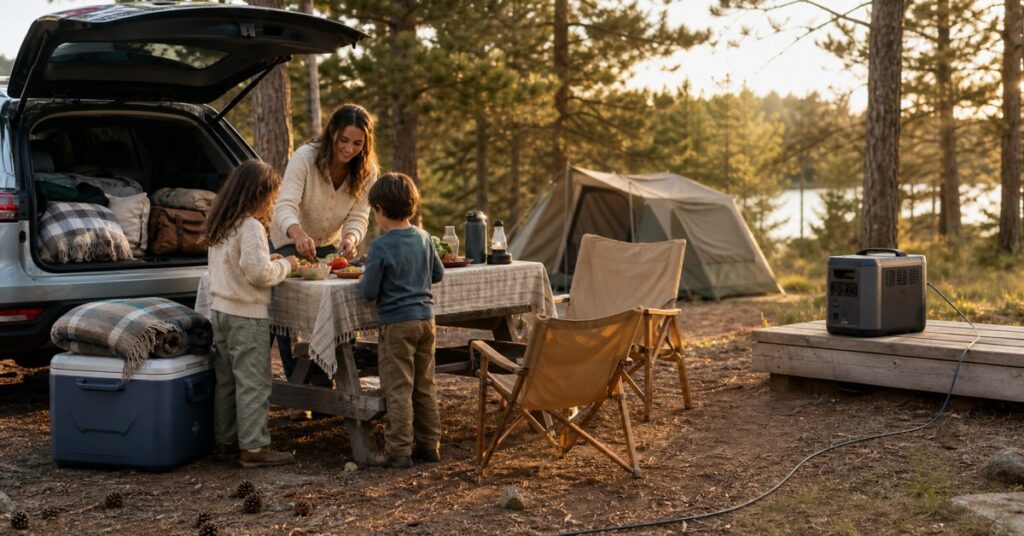
By late afternoon at a family campsite, every battery seems to be asking for help at once. Two phones are fading, the cooler has been running since breakfast, someone wants the tablet while dinner happens, and the campsite light still needs to make it through bedtime.
A portable power station can make that whole situation easier. It can also become one more heavy box taking up trunk space between the tent, sleeping bags, snack bin, and everything else a family somehow needs for two nights away.
You do not need the biggest battery you can afford. You need the smallest station that can cover your devices, trip length, and recharge plan—with enough breathing room that one cold night or an extra laptop session does not wreck the math.
For most families, I would start with one of two sizes:
- A compact 250–300Wh station for phones, tablets, cameras, lights, laptops, and short trips.
- A roughly 1kWh station for a powered cooler or portable fridge, several devices, and a weekend without dependable recharging.
My top overall pick is the Anker SOLIX C1000 Gen 2 because it puts 1,024Wh, 2,000W of continuous AC output, and fast recharging into a reasonably compact 24.9-pound box. If you want a quieter, simpler 1kWh option and do not need as much output, the Jackery Explorer 1000 v2 is the better alternative.
The Best Portable Power Stations for Family Camping
| Product | Capacity | Continuous AC output | Weight | Best for | Biggest compromise |
|---|---|---|---|---|---|
| Anker SOLIX C1000 Gen 2 | 1,024Wh | 2,000W | 24.9 lb | A family weekend with mixed gear | Fans are noticeable at high load; no expansion battery |
| Jackery Explorer 1000 v2 | 1,070Wh | 1,500W | 23.8 lb | A quieter 1kWh campsite setup | Three AC outlets; car and solar cables are not included |
| Anker SOLIX C300 AC | 288Wh | 300W | 9.1 lb | Phones, laptops, cameras, lights, and light AC gear | Only 300W of continuous AC output |
| BLUETTI Elite 30 V2 | 288Wh | 600W | 9.48 lb | More short-burst AC headroom in a compact box | Not my pick for a fridge or UPS duty |
| Anker SOLIX C300 DC | 288Wh | None | 6.17 lb | USB-C and 12V-only road trips | No AC outlet or wall charger |
Start With Your Devices, Not the Battery
The number on the front of a power station tells only part of the story.
Watt-hours (Wh) tell you how much energy the battery stores. Watts (W) tell you how much power the station can deliver at one time. A 288Wh station may have enough stored energy for several small devices, but a 300W inverter still cannot run something that needs 700W.
You also cannot use every advertised watt-hour through an AC outlet. The inverter consumes energy while converting battery power to household AC. In independent testing, the 1kWh picks in this guide delivered roughly 83% to 87% of their rated capacity through AC, while the Anker C300 AC delivered about 240Wh from its 288Wh battery.
For a simple planning estimate, use:
Estimated runtime in hours = battery watt-hours × 0.80 ÷ device watts
I use 0.80 on purpose. Temperature, inverter draw, battery settings, cable losses, and the way a device cycles on and off can all change the result.
For example, a device that continuously pulls 60W would have a planning estimate of:
288Wh × 0.80 ÷ 60W = about 3.8 hours1,024Wh × 0.80 ÷ 60W = about 13.7 hours
Those are planning numbers, not promises. A fridge compressor does not draw the same power every minute, and its startup surge may be much higher than its normal running wattage. On the other hand, a laptop marked 65W may pull far less once its battery is mostly charged.
A simple family load planner
Write down the information for the devices you actually plan to bring:
| Device | Watts | Hours per day | Days | AC, USB-C, or 12V | Planned watt-hours |
|---|---|---|---|---|---|
For a device that runs continuously, multiply watts by hours and days. For phones, cameras, and other rechargeable gear, use the battery capacity or the energy shown by a USB meter if you have one. Then add a cushion instead of planning to arrive home at exactly 0%.
300Wh vs. 1kWh: Which Size Makes Sense?
Choose about 300Wh when:
- The trip is one night or a short weekend.
- Your list is mostly phones, tablets, camera batteries, lights, and one laptop.
- You can recharge while driving or at a powered campsite.
- Low weight matters more than keeping a fridge running for days.
- You are willing to check battery level and manage which outputs stay on.
A compact station is much easier to tuck beside a cooler or carry to a picnic table. It is also easier to overestimate. Once an AC inverter, a fan, or a cooler enters the plan, 288Wh can disappear surprisingly quickly.
Choose about 1kWh when:
- A portable fridge or powered cooler is central to the trip.
- Several people will be charging devices.
- You are camping for a full weekend with no reliable outlet.
- You want enough power for bad-weather time in the tent without rationing every phone charge.
- You would rather carry one heavier station than manage two smaller batteries.
A 1kWh station is still not whole-home backup, and it is not an invitation to pack an electric kettle or space heater. It simply gives a family more room for ordinary campsite electronics and less predictable use.
Anker SOLIX C1000 Gen 2: Best Overall for a Family Weekend
If your packing list includes a portable fridge, phones, a laptop, lights, and camera gear, the C1000 Gen 2 gives you the most useful margin of the five.
Its 2,000W continuous AC output is more than most families need for normal campsite electronics, but that extra headroom matters when a compressor starts or several chargers are connected at once. It also has five AC outlets, two 140W USB-C ports, another USB-C port, USB-A, and a 12V car outlet. You are less likely to spend the evening swapping plugs.
The battery holds 1,024Wh. Independent tests measured about 83% to 87% of that as usable AC energy, or roughly 850–890Wh. For trip planning, I would still use the more conservative 80% factor above rather than building a weekend around the full label number.
Wall charging is fast. The quickest mode can refill the station in about 49 minutes under the right conditions, and it accepts up to 600W of solar input. A short window at a powered campsite can actually put meaningful energy back into the battery.
At 24.9 pounds, this is a deliberate carry, not something you casually toss into a tote. The fans become noticeable during fast charging and heavier loads. There is no expansion-battery option, and no built-in campsite light.
I also would not buy it mainly as a UPS. Its manual lists a roughly 10ms transfer time, but owner reports include occasional AC relay, overload, and pass-through problems. For family camping, it is a strong power station. For medical equipment or a computer that truly cannot shut down, compatibility needs to come from the device manufacturer and a real test of your exact setup.
Jackery Explorer 1000 v2: Best Quieter 1kWh Alternative
The Jackery makes sense for a family that wants 1kWh capacity without prioritizing the highest inverter output.
It stores 1,070Wh and weighs 23.8 pounds. OutdoorGearLab measured about 910Wh of usable AC energy, or roughly 85% of the rated capacity. That is enough to put it in the same practical weekend category as the Anker, even though its continuous AC output is lower at 1,500W.
At a campsite, its calmer setup may matter more than the lower output. The Explorer 1000 v2 has a compact shape, simple controls, and relatively quiet operation under ordinary loads. If it will sit near a sleeping area or picnic table, that can be worth more than another 500W you may never use.
You do give up some flexibility. There are three AC outlets instead of five, and solar input tops out at 400W. The two USB-C ports provide up to 100W and 30W, but they are outputs only; they cannot recharge the station. The standard standalone package includes the station and AC charging cable, not the car or solar charging cables.
Check the Energy Saving settings before trusting it with a low-draw or cycling device. The AC output may shut down after an extended period at low load, and 12V cooler compatibility can vary. One owner may run a cooler without trouble while another finds that a particular compressor or connector does not behave well. Test your exact cooler at home through a full cycle before it becomes responsible for a weekend of food.
Anker SOLIX C300 AC: Best Compact Station for Everyday AC and USB-C Gear
The C300 AC is the compact pick for families who still want household outlets.
At 9.1 pounds, it is far easier to move around a campsite than either 1kWh model. Its 288Wh battery is a sensible size for phones, tablets, a laptop, camera batteries, lights, and other small electronics. Two USB-C ports can each deliver up to 140W, so a compatible laptop does not need to use the AC inverter at all.
The biggest number to remember is 300W. That is the continuous AC limit. Anker also lists a 600W SurgePad mode for compatible resistive loads, but it does not turn this into a normal 600W power station. I would not use it as a reason to bring a coffee maker, kettle, heater, or other high-draw appliance.
Independent testing found about 240Wh of usable AC energy. That is a useful reality check: this is a short-trip station, not a tiny 1kWh substitute.
The vertical shape saves floor space, but it needs to stay upright. The shoulder strap is sold separately. In the standard US package, count on the station and AC charging cable; do not assume a car or solar cable is included.
The practical caution is reliability. Some owners report units that stopped charging, an inconsistent AC button, or a failed port. Test every output and charging method while the return window is still open.
BLUETTI Elite 30 V2: Best Compact Station for More Short-Burst AC Headroom
This is a specific pick, not a general recommendation for every small-power-station shopper.
The Elite 30 V2 weighs 9.48 pounds and stores 288Wh, almost the same compact class as the Anker C300 AC. Its advantage is a 600W continuous inverter. If you have a device that genuinely needs more than 300W for a short period, that extra headroom changes what the station can start and run.
It also has a 140W USB-C port, a 100W USB-C port, two USB-A ports, a 12V car outlet, and two DC5521 outputs. The standard package includes an AC cable and car charging cable, although the solar cable is separate.
Capacity is still capacity. A 600W inverter does not make a 288Wh battery last longer. BLUETTI’s Power Lifting setting is also not a 1,500W continuous rating; it changes voltage for certain resistive loads while the inverter remains limited.
Here is the limit: I would not choose this model for unattended fridge or UPS duty. Owner discussions include small fridges that would not stay running, pass-through problems during rapid power flickers, firmware-related AC charging issues, and more idle drain than expected. Its ECO setting is enabled by default and can turn off low-load AC or DC outputs.
The right use is active, short-term power: charging devices, running compatible electronics, or handling a brief load that a 300W compact station cannot. If your main goal is to keep a fridge or medical device running overnight, move up to a 1kWh setup and confirm compatibility with your exact device.
Anker SOLIX C300 DC: Best for USB-C and 12V-Only Trips
The C300 DC is the easiest model here to misunderstand. It is not a smaller version of the C300 AC. It has no AC outlets at all.
That is exactly why it can work for the right road trip. At 6.17 pounds, it is the lightest pick in this guide. It has two 140W USB-C input/output ports, another 100W USB-C port, a lower-power USB-C port, USB-A, and a 12V car outlet. If your family is charging phones, tablets, USB-C laptops, cameras, and compatible 12V gear, you are not carrying an inverter you never use.
The compromise starts before the first trip: Anker does not include a wall charger. The box contains the station and a USB-C cable, and first activation needs a compatible charger that can provide at least 18W at 9V. For the least frustrating setup, I would use a dedicated, standards-compliant USB-C PD charger rather than assuming every older or multi-port brick will negotiate correctly.
This matters because charging compatibility is the model’s weak point. Owner reports include certain multi-port chargers falling back to about 5W, the station stopping input after sitting connected, and units that stopped charging after limited use. Its low-current USB ports can also shut down after about two hours, which can interrupt an active cable or a device that sips power.
I would choose it only when the no-AC design is a benefit, not a surprise. Test your charger, cables, laptop, and 12V device together before leaving. For a family that wants ordinary wall outlets or unattended low-load power, the C300 AC is the better fit.
How to Choose Without Overbuying
Give the startup surge some room
Fridges, coolers, pumps, and anything with a motor may pull much more power when starting than while running. Check both the normal wattage and startup requirement. If the manufacturer does not provide a startup figure, test the device with the station before the trip instead of assuming a 60W label tells the whole story.
Use the most direct compatible output
If a laptop can charge from USB-C, using USB-C avoids turning battery DC into AC and then back into DC through a laptop brick. A compatible 12V cooler may also be more efficient on the car outlet than on its household adapter.
The word compatible matters. Match voltage, current, connector, polarity, and cable rating. Do not improvise adapters around a high-current 12V connection.
Decide how you will recharge
Before buying, finish this sentence:
“If the battery is low on Saturday afternoon, I will recharge it by _____.”
Your real options may be:
- A campground outlet.
- The vehicle’s 12V outlet while driving.
- A compatible solar panel in reliable sun.
- No recharging until you get home.
That answer may matter more than another 100Wh. A smaller station that can recharge during a long drive can be more useful than a larger one that stays empty.
Check what is actually in the box
“Solar generator” does not mean a solar panel is included. A product photo may show a panel, shoulder strap, or car cable that belongs to a bundle rather than the standalone station.
For the five picks here:
- The Anker C300 DC does not include a wall charger.
- The Anker C300 AC shoulder strap is separate.
- The standalone Jackery Explorer 1000 v2 does not include car or solar charging cables.
- The BLUETTI Elite 30 V2 includes a car cable but not its solar cable.
- The Anker C1000 Gen 2 package contents should be checked on the exact listing before ordering because current documentation is not perfectly consistent about the car cable.
Think about where the station will sit
The unit needs a stable, dry, ventilated spot with its cooling vents clear. It should not live under a blanket, on soft bedding, in a puddle-prone corner, or where a toddler can press buttons and tug cords.
This sounds obvious at home. At a campsite after dark, with jackets, bedding, and snack bags migrating everywhere, it takes a little planning.
A Safer Campsite Power Setup Around Kids
- Put the station on a firm, dry surface where children cannot sit on it or reach the outlets.
- Keep every cooling vent open. Do not cover the unit with clothing, a sleeping bag, or a towel.
- Route cables around the edge of the campsite instead of across the path to the tent or picnic table.
- Keep connectors off wet ground and follow the exact model’s rain and moisture warnings.
- Do not charge or store the station in a closed, sun-heated vehicle.
- Keep high-draw cooking and heating appliances off the family power plan.
- Test low-load auto-off settings before using a cooler, light, or other device overnight.
- Use only compatible, undamaged cables. Stop using any plug or cable that becomes unusually hot, smells scorched, discolors, or fits loosely.
- A battery station has no fuel-burning engine or normal generator exhaust. A gas generator and an idling vehicle are different: never operate either in a tent, garage, vehicle, or other enclosed space.
For more help arranging the rest of the campsite around little kids, see Camping With a Baby or Toddler.
Is a Solar Panel Worth Packing?
For a one-night trip, usually not. Charging the station at home and topping it up during the drive is often simpler than finding trunk space for a panel.
A panel becomes more useful when:
- You will stay two or three days without an outlet.
- Your campsite gets several hours of open, direct sun.
- The panel’s voltage and connector match the station.
- Someone will be around to reposition it and keep it dry and secure.
It is less useful under dense trees, during unreliable weather, or on a trip where the family moves every day. A “200W” panel will not produce 200W from breakfast to dinner. Shade, sun angle, heat, clouds, and cable losses all reduce input.
Do not size the entire trip around perfect solar output. Treat solar as a way to extend your battery, not a guarantee that the battery will be full by sunset.
Frequently Asked Questions
What size portable power station do I need for a weekend camping trip?
For phones, tablets, lights, cameras, and a laptop, a 250–300Wh station may be enough for a short weekend if you have a recharge plan. If a powered cooler or portable fridge is essential, start around 1kWh and calculate from the device’s real wattage, runtime, and startup surge.
Can a portable power station run a camping fridge?
Often, yes—but capacity is only one part of the answer. The station must handle the fridge’s startup surge, provide the correct AC or 12V connection, and keep that output on when the compressor cycles off. Test a full cooling cycle at home, including overnight behavior, before relying on it for food.
Power is not the same as food safety. Keep an appliance thermometer inside the fridge or cooler and keep perishable food at 40°F (4°C) or below, as FoodSafety.gov recommends. Bring a backup cold source instead of assuming the battery percentage will protect dinner.
Is a 300Wh power station enough for family camping?
It can be enough for a one-night trip or a light weekend built around personal electronics. It is usually too small for several days of continuous fridge use, multiple AC devices, or a trip with no chance to recharge.
Can I charge a power station from the car while driving?
Many models can charge from a 12V vehicle outlet using the manufacturer’s compatible cable. Check the station manual and the vehicle outlet rating, keep the vehicle running as directed so you do not drain the starter battery, and do not substitute a loose or unrated adapter. A vehicle’s built-in AC outlet may not support a station’s fast wall-charging mode.
For more road-trip setup help, see Road Trip With a Baby or Toddler.
What is the difference between a power station and a solar generator?
In most shopping listings, a “solar generator” is a portable power station that can accept solar input. It does not create energy by itself, and the solar panel may be sold separately.
Can I leave a portable power station in a hot car?
I would not. The charging, operating, and storage temperature limits differ by model, and a closed vehicle in summer can climb beyond them quickly. Store the station out of direct sun and follow its manual. If the unit is hot from the car, let it return to an allowed temperature before charging or using it.
See How Hot Is Too Hot for a Baby? for the wider family heat-safety plan.
Can I use a portable power station inside a tent?
A battery station has no fuel-burning engine or normal generator exhaust, but it is still a high-energy electrical device. If it is inside, keep it completely dry, upright where required, well ventilated, away from bedding, and out of children’s reach. Keep cords away from the tent exit. Never bring a fuel generator into a tent.
The Bottom Line
The best camping power station is not the one with the biggest number on the product page. It is the one that covers your real devices, fits the way you can recharge, and is not so heavy that you leave it home on the next trip.
For a family weekend with a cooler and mixed electronics, I would start with the Anker SOLIX C1000 Gen 2. Choose the Jackery Explorer 1000 v2 when a quieter, simpler 1kWh setup matters more than maximum output. For a lighter trip, the Anker C300 AC covers the widest range of ordinary devices without taking over the trunk.
Before ordering, make the device list. Check the startup load. Confirm the cables in the box. Then choose the smallest station that meets the plan with room to spare.
That is usually the battery your family will actually bring.