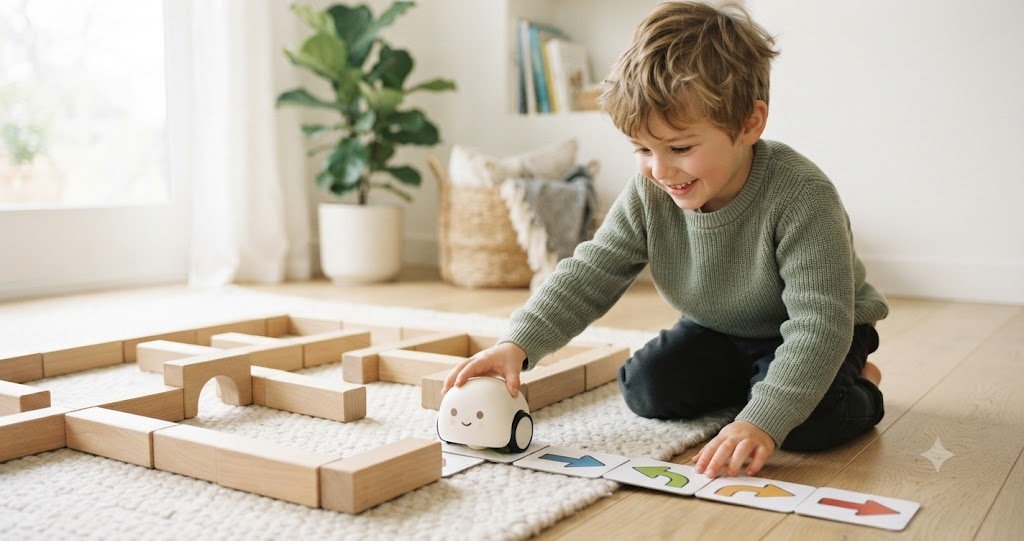
Somewhere between the “every kid needs to learn to code” headlines and the “please, not another screen” panic, there is a very reasonable question quietly waiting: can a preschooler actually learn coding without a tablet?
Short answer: yes, and honestly, the no-screen version is the better fit for little ones anyway. The thinking underneath coding (put steps in order, notice cause and effect, spot the mistake, try again) is exactly the kind of hands-on, trial-and-error play that three-, four-, and five-year-olds are wired for. They do not need a login. They need to push a button and watch something roll across the kitchen floor.
Here is the part the gift guides skip: a surprising number of “coding robots” marketed to this age group quietly require a phone or tablet to do anything interesting. So before rounding up the usual suspects, I screened for the one thing the title promises: genuinely screen-free, with no companion app required to play. When my daughter was around five, the coding toys that actually held her attention were never the ones with the slickest app; they were the ones she could pick up and start without anyone hunting for a charger or an OS update first.
Below: three robots that pass that bar, an honest look at the ones you have seen everywhere that did not make the cut (and why), and a few screen-free coding ideas that need no robot at all.
What “coding” even means for a four-year-old
It helps to drop the word “coding” for a second. At this age you are really building four early-thinking muscles:
- Sequencing: doing things in the right order. Socks before shoes. Forward, forward, turn, then go.
- Cause and effect: “I pressed this, so that happened.” The foundation of every if/then a kid will ever write.
- Debugging: the robot went off the edge of the table, so what do we change? This is arguably the single most valuable habit here, and it is just problem-solving with a cuter name.
- Spatial reasoning: mapping a path, predicting where something will end up, thinking in turns and steps.
None of that needs a screen, and for young children there is a decent argument that a screen gets in the way. Major pediatric guidance has long emphasized hands-on, interactive, caregiver-supported play over solo screen time for the under-six crowd (see the American Academy of Pediatrics media guidance). Early computer-science educators make a similar point: the concepts land best when kids can physically arrange the steps and watch the result play out in the real world, not behind glass. It is the whole idea behind “unplugged” coding lessons from groups like Code.org.
Translation: a robot your child programs by pressing buttons or laying out cards is doing real cognitive work. It just looks like play, which is the whole point.
How to choose a screen-free coding robot
1. Is it actually screen-free?
This is the big one. Some robots are programmed entirely on the device itself (buttons, a remote, or physical cards), so they are truly screen-free. Others use “screen-free” as a headline but really shine only once you connect an app, which quietly puts a tablet back in your kid’s hands. Read the fine print for words like “download the app to unlock” or “Bluetooth required.”
2. Does the age actually fit?
A three-year-old and a six-year-old are different humans. A newly-three kiddo does best with big buttons and instant feedback; a five- or six-year-old can handle multi-step sequences, turns, and little logic puzzles. Watch for toys that stretch across the range so they do not get outgrown by next birthday.
3. Open-ended or one-trick?
The robots that earn their shelf space let kids build their own mazes and stories, not just run a single scripted routine. Open-ended means replay value, which means fewer toys quietly migrating to the donate pile.
4. Durable and (please) storable
Most of these sets come with a lot of little pieces: cards, walls, tunnels, tiles. That is great for play and less great at 7 a.m. when one crucial coding card has vanished under the couch. A sturdy robot and a bin with a lid go a long way.
The picks: three genuinely screen-free coding robots
A quick, honest note on how I chose: I looked for robots that are truly screen-free, well-established, consistently well-reviewed by parents and teachers, in age range for 3–6, and actually easy to buy right now. That bar is higher than it sounds (more on that in the next section), but these three clear it.
1. Botley 2.0 the Coding Robot — Best Overall & Grows With Them
Learning Resources Botley 2.0 Activity Set
If you want one robot that can start simple and still be interesting a year later, Botley 2.0 is the one most experienced parents and classroom teachers point to. It is programmed entirely with a handheld remote: no phone, no tablet, no app, ever. Little coders line up commands and press go, and Botley trundles off to follow them.
What makes it grow with them is the depth hiding under the friendly exterior. It can run long multi-step sequences, take 45-degree turns, follow black lines, detect and steer around obstacles, and unlock silly transformations (train, police car, ghost) that keep the novelty alive. The activity-set version is the one worth getting for home: it bundles the coding cards, double-sided boards, and stackable obstacle pieces so kids can build their own mazes and missions instead of running the same loop.
Screen-free: 100% — remote programmer, no app
Skills: sequencing, loops, obstacle logic, spatial reasoning
In the box: Botley 2.0 robot, remote programmer, coding cards, double-sided boards, stackable obstacle pieces (78-piece set)
Batteries: 5 AAA (not included)
Price: around $90–100
Best for: the older end of this range (roughly 5–6), families who want a single robot that scales in difficulty, and kids who love a robot with a bit of personality.
Honest drawbacks: aimed at 5+, so a just-turned-three will not get much from it yet. It needs five AAA batteries, and there are enough small parts that a storage bin is not optional.
2. Code & Go Robot Mouse Activity Set — Best for Maze-Lovers
Learning Resources Code & Go Robot Mouse Activity Set
Colby the robot mouse has been a screen-free coding staple for years, and for good reason: the “program a path, then watch it race to the cheese” loop is instantly understandable to a four-year-old, and genuinely satisfying. Kids snap together a maze from grid tiles, walls, and tunnels, lay out color-matched coding cards, press the matching buttons on the mouse, and hit go.
The activity set is the sweet spot because it comes with everything needed to build real mazes right away: the tiles, walls, tunnels, coding cards, and challenge cards that ramp up in difficulty. It is a lovely bridge into planning several steps ahead, and the physical maze-building is half the fun.
Screen-free: 100% — on-mouse buttons, no app
Skills: sequencing, directional logic, planning
In the box: Colby the mouse, maze grids, maze walls, tunnels, double-sided coding cards, activity cards, cheese wedge, activity guide
Batteries: 3 AAA (not included)
Price: around $55–60
Best for: maze-obsessed kids, the 4–5 range, and anyone who wants an open-ended build-your-own-course robot.
Honest drawbacks: the wheels can be a little fragile if a frustrated kid shoves the mouse by hand instead of letting it drive (worth a gentle “let Colby do the walking” rule). The tiles snap together with a right-way-round connector that younger fours may need a hand with, and yes, three AAA batteries, not included.
3. Code & Go Robot Mouse (Just the Mouse) — Best Budget Entry Point
Learning Resources Code & Go Robot Mouse
Not sure your kid will bite? This is the low-commitment way to find out. You get Colby the mouse and the coding cards, minus the full maze kit, so you improvise a “maze” from books, blocks, and painter’s tape on the floor (which, frankly, kids love). Same buttons, same lights and sounds, same core skill of stringing commands together.
It is also a genuinely good pick for a wide range of learners, and it is often praised for how well its tactile, no-screen play holds a young child’s focus. If it clicks, you can always add the maze pieces later.
Screen-free: 100% — on-mouse buttons, no app
Skills: sequencing, cause & effect
In the box: Colby the mouse, double-sided coding cards, activity guide (no maze grids — you supply the play surface)
Batteries: 3 AAA (not included)
Price: around $38–42
Best for: testing the waters on a budget, families who like to improvise a maze from what they already own, and the youngest end of the range with grown-up co-play.
Honest drawbacks: with no maze kit in the box, the out-of-the-box wow is quieter than the full set — you are bringing the play surface. Same fragile-wheels caveat, same battery situation.
But what about the ones you have seen everywhere?
If you have done any browsing, you have bumped into a handful of other names. I am not including them as top picks, and I would rather tell you honestly why than pretend the category is bigger than it is.
Ozobot Evo: screen-free, with an asterisk
Evo is a clever little robot with two ways to code: genuinely screen-free “color codes” you draw with markers on paper, and on-screen block coding through an app on a computer or tablet. The color-code mode is real and fun, but the robot’s actual depth (the multi-level block coding, the games, even firmware updates) lives in the app, and its sweet spot skews older, more like eight and up. So calling it a screen-free toy for a three-year-old oversells it. If you have an older sibling who will grow into full coding, it is worth a look; as a pure screen-free pick for the 3–6 set, it is not the one.
Cubetto: beautiful, but hard to get and pricey
The wooden, Montessori-friendly Cubetto is a lovely, truly screen-free design that plenty of educators adore. The practical problem for most families: it is expensive and mainly sold direct rather than through the usual retailers, so it is hard to just add to a cart and have by the weekend. Wonderful in theory, annoying to actually buy.
Coding Critters: adorable, more “coding-flavored pet” than robot
These interactive, plush-ish pets are cute and lean into storytelling, which some kids love. They are screen-free, but they are lighter on the build-your-own-maze, open-ended programming that makes the picks above worth the money. Think of them as a gentle first taste rather than a robot your child will really program.
Bee-Bot: a classroom legend that is awkward to buy for home
If your child’s preschool has a chunky little bee that scoots around a floor mat, that is Bee-Bot, a fantastic, truly screen-free classroom tool. It is just mostly sold through education channels in bulk, so for a single home purchase it is oddly hard to find at a sane price.
Fisher-Price Code-a-Pillar: mostly retired
A lot of “best toddler coding toy” lists still name the Code-a-Pillar, but it has largely been discontinued, so you will mostly find it secondhand or at inflated prices. Sweet concept, tricky to actually recommend today.
Screen-free coding without any robot at all
The good news? Your child can practice every one of those early-coding skills with things you probably already own: no robot, no batteries, no checkout required. A few favorites:
- “You be the robot.” Your kiddo gives you (or, even better, your partner) step-by-step commands to cross the room (“two steps forward, turn, one step”). When you march straight into the couch because that is literally what they told you to do, they learn debugging and laugh doing it.
- Arrow-card treasure hunts. Draw simple direction arrows on index cards, then lay out a sequence that leads to a hidden snack. Same idea as the robot mouse, zero dollars.
- Everyday sequencing. “What are the steps to make a sandwich?” Getting the order wrong on purpose (jelly on the plate, bread on top) is both hilarious and secretly educational.
- Screen-free coding board games. There are card and board games built entirely around sequencing and pathfinding for this age, great for rainy-day, no-battery play.
Want more low-lift ideas along these lines? Our roundup of screen-free activities for toddlers has a pile of them, and I put together a free printable pack of screen-free coding games and arrow-card challenges you can print and play in five minutes.
Quick age guide: what fits when
| Age | What they are ready for | Best match here |
|---|---|---|
| 3–4 | Big buttons, instant feedback, very short sequences, lots of grown-up co-play | Code & Go Robot Mouse (base) with a taped-floor maze; mostly unplugged games |
| 4–5 | Building simple mazes, planning 3–5 steps ahead, matching cards to commands | Code & Go Robot Mouse Activity Set |
| 5–6 | Longer sequences, turns and loops, obstacle logic, “what went wrong?” fixing | Botley 2.0 Activity Set |
Frequently asked questions
Is my three-year-old too young for a coding robot?
For most just-turned-threes, the button-and-card robots are a stretch on their own, but they are not too young for the ideas. Start with “you be the robot” and simple arrow-card games, and add a robot like the Code & Go mouse around four, when following a short sequence starts to click.
Do screen-free coding robots actually teach coding?
They teach the thinking that coding is built on (sequencing, cause and effect, and debugging), which is exactly what matters at this age. Nobody is writing Python at five. But a kid who is comfortable planning steps, predicting outcomes, and fixing a plan that did not work has a real head start when actual code shows up later.
Screen-free robot or a tablet coding app: which is better for little kids?
For the under-six crowd, the hands-on, no-screen version generally wins: the concepts are more concrete when kids physically arrange steps and watch a real object respond, and you sidestep the screen-time tug-of-war entirely. Apps have their place later; they are just not the strongest fit for the youngest learners.
How is this different from Osmo or an iPad coding game?
Those are screen-based by design: the play happens on a tablet. The robots here are the opposite — the “screen” is your living-room floor, and the feedback is a physical robot moving in real space. Both can teach coding concepts; only one keeps your preschooler off a device.